
Feature guide
Codex CLI history: find, resume and read old sessions
Where Codex CLI keeps session history, how codex resume and codex fork find it, jq one-liners for rollout files, and viewing it all in VS Code.
Builds Claude Code and Codex Assist
- Published
- Updated
- Data as of
- Reading time
- 9 min read
TL;DR: Codex CLI saves every session as a JSONL "rollout" file under ~/.codex/sessions/YYYY/MM/DD/. To continue one, run codex resume (current folder), codex resume --all (every folder) or codex resume --last. To branch without touching the original, use codex fork. To read a session without Codex, a few jq commands below will list sessions, print your prompts and show which files changed. To browse, search and diff all of it inside VS Code, install CCAssist.
Where is my Codex CLI history stored?#
Codex CLI writes one file per session to ~/.codex/sessions/, grouped into year, month and day folders. The file is a rollout: a JSONL file (one JSON object per line) that holds the whole session in order, including your prompts, the model's replies, tool calls, command output and token counts. If you set the CODEX_HOME environment variable, everything below lives under that folder instead of ~/.codex.
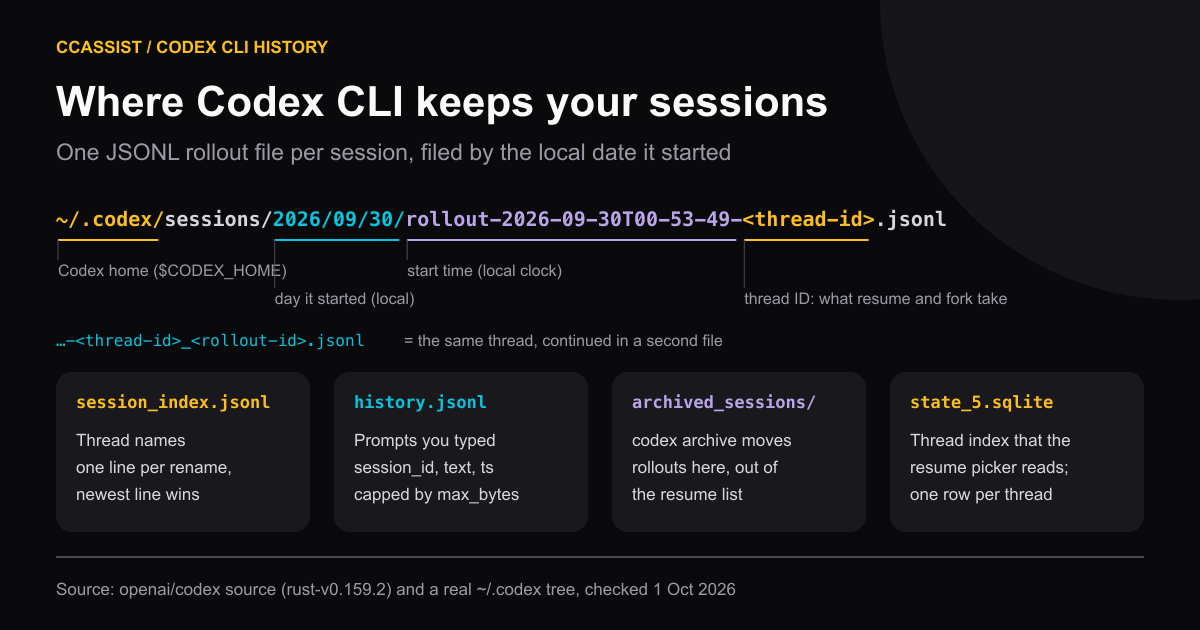
Here is what each file in ~/.codex is for:
| Path | What it holds | Useful for |
|---|---|---|
sessions/YYYY/MM/DD/rollout-<time>-<thread-id>.jsonl | The full session, line by line | Reading or searching a session |
session_index.jsonl | id, thread_name, updated_at, one line per rename; the newest line wins | Mapping a name back to a thread ID |
history.jsonl | Each prompt you typed: session_id, text, ts | Finding which session a prompt was in |
archived_sessions/ | Rollouts moved here by codex archive | Recovering a session that left the resume list |
state_5.sqlite | A threads table, one row per thread | What the resume picker reads |
A few details matter once you start looking by hand:
- The folder date and file-name time use your local clock. On my machine (UTC+5:30), a session named
rollout-2026-09-30T00-53-49-…records2026-09-29T19:23:49Zas its start time inside the file. A late-night session can sit in the next day's folder. - One thread can span two files. A file named
rollout-<time>-<thread-id>_<rollout-id>.jsonlcontinues the thread whose ID comes before the underscore. The Codex source uses this name when a thread gets a new rollout ID. I had 15 such files out of 1,590. - Sub-agents get their own rollout files. When Codex spawns a sub-agent, the child writes a separate rollout whose first line names the parent under
source.subagent.thread_spawn.parent_thread_id. In my last 60 rollout files, 23 were sub-agents. history.jsonlis only your prompts. It never holds replies, andhistory.max_bytesinconfig.tomlmakes Codex drop its oldest entries once the file passes that size (config source).
For scale: on 1 October 2026 my ~/.codex/sessions held 1,590 rollout files from December 2025 to September 2026, 1.6 GB in total. The files are plain text until something deletes them, so old sessions stay readable. Claude Code works differently and cleans up its transcripts after 30 days by default. Where Claude Code stores conversations covers that side.
Resume a Codex session with codex resume#
codex resume is the built-in way back into an old session. It opens a picker of recent sessions started in the current folder; choose one and Codex reloads the transcript and continues the same thread. These are the forms in the Codex CLI command reference and in codex resume --help (Codex CLI 0.159.2 was the latest npm release on 1 October 2026):
| Command | What it does |
|---|---|
codex resume | Picker of recent sessions from the current folder |
codex resume --all | Picker across every folder, with a working-folder column |
codex resume --last | Skips the picker and reopens the most recent session here |
codex resume <id or name> | Reopens one session by thread ID (a UUID) or by name |
codex resume --include-non-interactive | Also lists sessions started with codex exec |
codex exec resume --last "next step" | Continues a non-interactive run with a follow-up prompt |
/resume inside Codex | Opens the same picker without leaving the TUI |
When you quit, Codex prints the exact command to get back: To continue this session, run: codex resume <id>. Inside a running session, /status shows the session ID. Some guides suggest /rollout to print the file path; in the current source that command only exists in debug builds, so a normal install won't show it.
If the session started in a different folder from where you are now, Codex asks which folder to use. Set tui.resume_cwd to "current" or "session" in config.toml to skip that question.
Why is a session missing from the picker?#
Work through these in order:
| Symptom | Likely cause | Fix |
|---|---|---|
| Session from another project is missing | The picker filters by current folder | codex resume --all |
A codex exec run is missing | Non-interactive sessions are hidden | --include-non-interactive |
| Session vanished after cleanup | It was archived | codex unarchive <id or name> |
| You copied a rollout file in by hand and it doesn't show | The picker reads the threads table in state_5.sqlite, not the folder | Resume it by ID, or open it with a viewer that reads the files |
| You only remember what it changed | The picker shows names and previews, not contents | Search the files (below) |
Fork a session instead of continuing it#
codex fork starts a new thread from a copy of an old one. The original rollout stays as it was, so you can try a different approach from the same starting point and still go back. It takes the same --last and --all flags and a thread ID. Inside Codex, /fork forks the chat you are in.
Two related commands tidy the list rather than branch it. codex archive <id or name> moves a session's rollout into ~/.codex/archived_sessions/ and out of the resume list; codex unarchive brings it back. codex delete <id or name> removes a session permanently, so copy the rollout somewhere first if you might want it later.
Read Codex rollout files with jq#
You don't need Codex running to read history. Every line in a rollout has a type and a payload, and the first line is always session_meta.
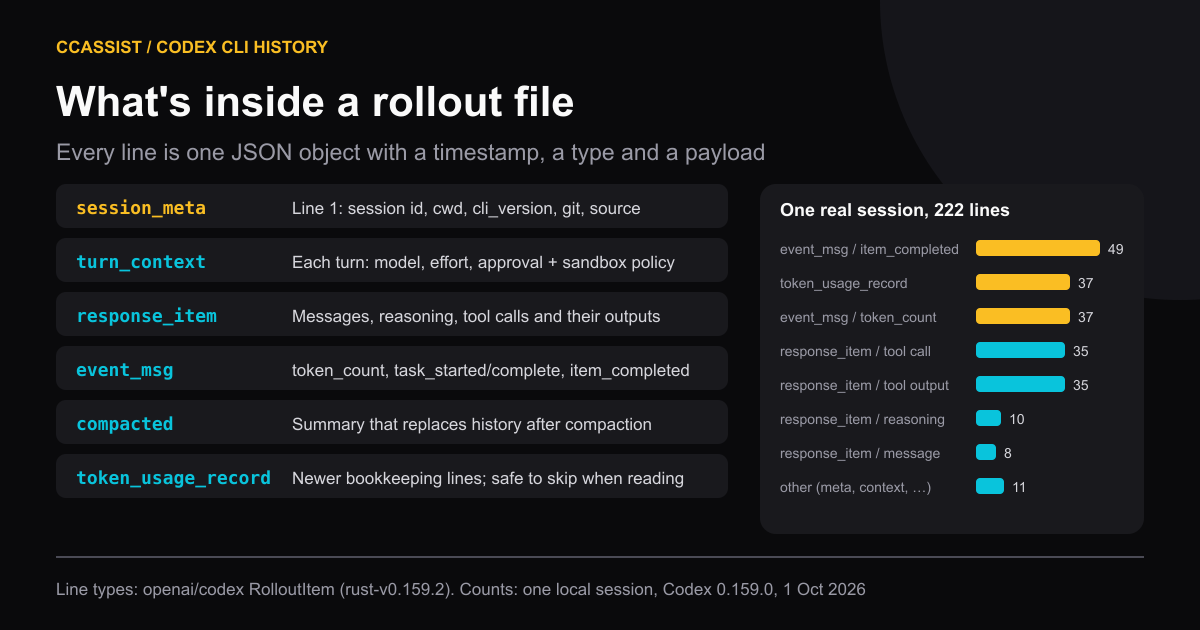
I tested these commands on 1 October 2026 against a sample of rollouts on my machine written by Codex 0.80 to 0.159. Replace FILE with a rollout path.
List your 10 newest sessions with their folder and thread ID:
find ~/.codex/sessions -name 'rollout-*.jsonl' | sort | tail -n 10 |
while read -r f; do
  head -n 1 "$f" | jq -r '[.payload.timestamp, .payload.cwd, .payload.id] | @tsv'
doneSorting by path works because the folders and file names start with the date. The thread ID in the last column is what codex resume and codex fork accept.
Print the prompts you typed in one session:
jq -r 'select(.type == "event_msg") | .payload
  | if .type == "user_message" then .message
    elif .type == "item_completed" and .item.type == "UserMessage"
      then (.item.content[]?.text // empty)
else empty end' FILECodex has recorded user messages in both shapes over time, so the filter checks for each. Reading response_item messages with role user also works, but those include the instructions and environment context Codex injects at the start.
List the files a session changed:
jq -r '
  (select(.payload.item.type? == "FileChange") | .payload.item.changes | keys[]),
  (select(.payload.name? == "apply_patch")
    | (.payload.input // .payload.arguments // "")
    | capture("\\*\\*\\* (Add|Update|Delete) File: (?<f>[^\\n]+)"; "g").f)
' FILE | sort -uNewer rollouts record edits as FileChange items; older ones only keep the apply_patch call, so the filter reads both. It lists files edited through Codex's patch tool. Files changed by a shell command (a sed -i, a heredoc) show up only as commands, not as file changes.
Show the session's running token total:
jq -c 'select(.payload.type == "token_count")
| .payload.info.total_token_usage' FILE | tail -n 1Find every session that mentions a word:
grep -rli --include='rollout-*.jsonl' 'stripe webhook' ~/.codex/sessionsThis matches tool output as well as conversation text, which is usually what you want when you remember an error message but not the prompt.
Browse Codex history in VS Code with CCAssist#
The CLI and jq answer "take me back to that session". They get slow when the question is "which session changed this file last Tuesday, and what exactly did it change?" CCAssist (Claude Code and Codex Assist, version 0.7.5 on the VS Code Marketplace as of 1 October 2026) reads the same ~/.codex/sessions files and shows them in a VS Code sidebar next to your Claude Code, Cursor, Grok and OpenCode sessions.
What it does with Codex sessions:
- Session list per project. Sessions are grouped by the folder they ran in, titled from
session_index.jsonlwhere a name exists, with a source badge so Codex and Claude Code rows don't blur together. - Readable transcripts. Prompts, replies, reasoning, commands and their output, images and Codex visualizations render as a conversation instead of JSON. Sub-agents appear in an agent bar inside the parent session, and threads split across two rollout files show as one session.
- Search across all sessions from one box, Codex and Claude Code together.
- Diffs. Files changed through Codex's patch tool open as before/after diffs, and you can jump from a file to the session that edited it.
- Resume and fork. A Resume action runs
codex resume <id>in a VS Code terminal (or opens the session in the Codex app or extension, if you set that as the target). Fork runscodex fork <id>. Both work for sessions the CLI picker no longer lists, as long as the rollout file still exists. - Convert to Claude Code format, or from Claude Code to Codex, to continue the same work in the other CLI.
- Usage and cost. Codex tokens and estimated costs appear in the same dashboard as Claude Code. Costs are estimates computed from token counts and published API prices; ChatGPT-plan users don't pay per token. The usage tracker page explains the numbers.
What is free and what needs Pro (checked in the extension source on 1 October 2026):
| Feature | Free | Pro |
|---|---|---|
| Browse and read Codex sessions | Yes | Yes |
| Search | All sessions; results older than 3 days are blurred | Full results |
| Diffs | Changes made the same day | Any date |
Resume, and codex fork in a terminal | Yes | Yes |
| Fork from a chosen message | No | Yes |
| Claude ⇄ Codex conversion, fork with summary | 3 each | Unlimited |
| Keep a backup copy of a session | 3 sessions | Unlimited |
| Usage dashboard | Last 7 days | Full history |
Pricing is on the upgrade page.
What it does not do: it reads ~/.codex/sessions (plus any folders you add under the claude-history.codexChatDirectories setting), not CODEX_HOME or ~/.codex/archived_sessions, so archived or relocated sessions need that setting or codex unarchive. It can't show a session whose rollout file was deleted. Transcripts stay on your machine; nothing is uploaded unless you turn on the optional community features.
If you'd rather have a free, focused browser, Codex History Viewer by hiztam browses, searches, tags and exports Codex CLI and Claude Code sessions (7,791 Marketplace installs, 4.9 from 8 ratings, version 2.15.0, read 1 October 2026). Pick it if you don't need diffs or usage numbers. For Claude Code's side of the same problem, see how to view Claude Code chat history.
How we checked#
- Codex CLI: commands and flags from
codex resume --help,codex fork --help(0.144.6 installed locally), the developer command reference and theopenai/codexsource at the rust-v0.159.2 release (29 September 2026), read 1 October 2026. - File layout and counts: one real
~/.codexfolder, checked 1 October 2026. Only structure, counts and JSON keys were read for this post; no prompts or code are shown. - CCAssist: features and Free/Pro limits checked against the extension source and changelog for version 0.7.5, the Marketplace release on 1 October 2026.
- Limits: Codex changes its rollout format often. New line types appear every few releases, so treat the
jqfilters as a starting point and checkjq -c 'keys' FILEif one returns nothing.
Install CCAssist from the VS Code Marketplace (or Open VSX for Cursor and Windsurf) and your Codex sessions appear in the sidebar, grouped by project, with diffs and a Resume button on each one.
Frequently asked questions
- Where does Codex CLI store conversation history?
- Each session is a JSONL rollout file under ~/.codex/sessions/YYYY/MM/DD/, named rollout-<start time>-<thread id>.jsonl. Thread names are in ~/.codex/session_index.jsonl and your typed prompts in ~/.codex/history.jsonl. If CODEX_HOME is set, look there instead of ~/.codex.
- How do I resume a previous Codex CLI session?
- Run codex resume to pick from recent sessions in the current folder, codex resume --all to see every folder, codex resume --last for the most recent one, or codex resume <thread id> for a specific session. Inside Codex, /resume opens the same picker.
- Why is my Codex session missing from the resume picker?
- The picker only shows the current folder unless you pass --all, hides non-interactive codex exec runs unless you pass --include-non-interactive, and hides archived sessions. It also reads a thread index in state_5.sqlite, so a rollout file copied into the folder by hand may not appear.
- What is the difference between codex resume and codex fork?
- codex resume continues the same thread and appends to its rollout file. codex fork starts a new thread from a copy of an old one, so the original session stays unchanged.
codexhistorydiffs