
Guide
Claude Code weekly limit and 5-hour limit, explained
How the Claude Code weekly limit and 5-hour session limit work on Pro and Max, when each resets, how to check what's left, and what to do at the limit.
Builds Claude Code and Codex Assist
- Published
- Data as of
- Reading time
- 10 min read

TL;DR: Pro and Max plans meter Claude Code two ways at once: a session limit that resets every five hours, and a weekly limit across all models that resets at a fixed day and time assigned to your account. Both are shared with claude.ai and Claude Desktop. Run /usage in Claude Code, or open claude.ai/settings/usage, to see how much is left and when each limit resets. When you hit one, you can wait, let Claude Code continue automatically after the reset, or turn on usage credits billed at API rates.
How the Claude Code weekly limit and 5-hour limit work#
Anthropic's plan pages describe two meters running at the same time (both updated 22 September 2026):
- Session limit. "Your session-based usage limit will reset every five hours." The Max plan page defines Max 5x and Max 20x as five and twenty times the Pro plan's per-session allowance.
- Weekly limit. Pro and Max "also have a weekly usage limit that applies across all models." It "resets at a fixed time each week that is assigned to your account," and that time stays the same no matter when you start using Claude or when your subscription began.
Every request counts against both meters. Claude Code's error reference warns that "a single burst of heavy activity, such as a large workflow fanout, can exhaust the weekly allowance before the session window resets."
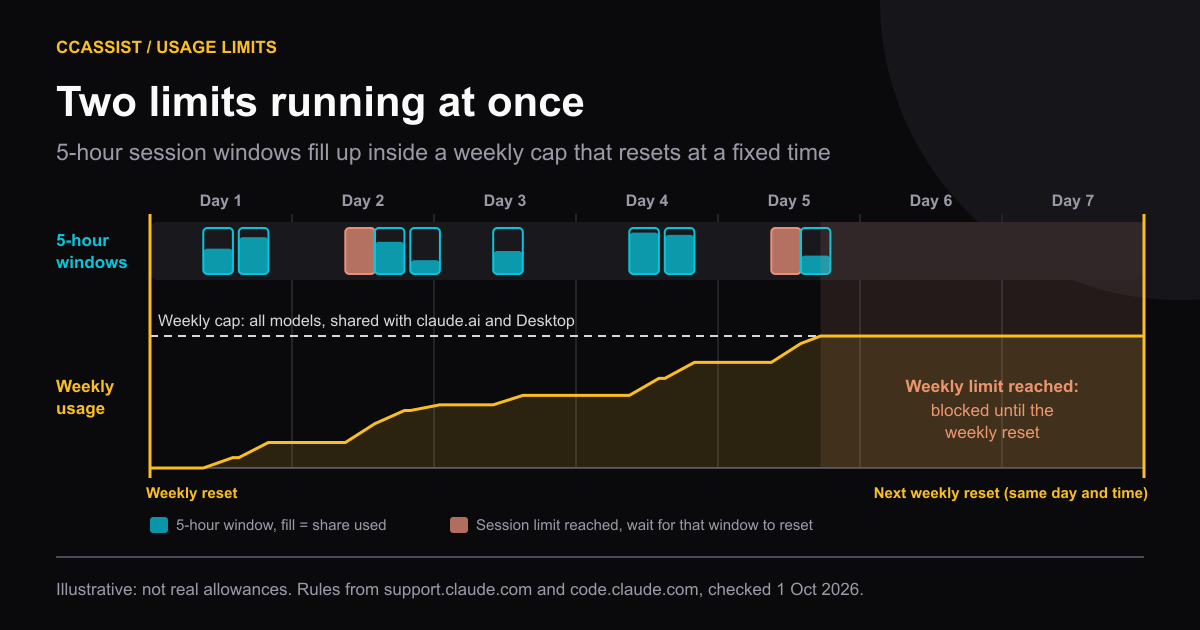
The limits are also shared across products. "Both Pro and Max plans offer usage limits that are shared across Claude and Claude Code," says the Claude Code plan article (updated 19 August 2026), and that includes Claude Code in VS Code, Cursor and JetBrains IDEs.
How big is the weekly limit?#
Anthropic doesn't publish one. The current help pages give no hour counts or message counts. Instead they list what changes how fast you use it: message and context length, tools, model, effort level and multi-step work (usage limit best practices, updated 22 September 2026).
Pages that still quote "40–80 hours of Sonnet per week" or a message count per 5 hours are citing figures no current Anthropic page states. The only reliable number is the percentage in your own /usage screen.
Model-specific weekly limits: Opus, Sonnet and Fable#
On top of the all-model weekly limit, some accounts have a separate weekly cap for one model family:
- Fable. On Max (and premium Team seats), "you can use up to 50% of your weekly usage limits on Fable models at no extra cost," and Fable uses the limit faster than other models. On Pro and standard Team seats, Fable 5 and 5.1 aren't part of the plan limits at all. They run on usage credits from the first request (Claude Fable models on your plan, updated 2 September 2026). Settings > Usage shows a separate Fable weekly bar "if included in your plan".
- Opus and Sonnet. Claude Code still has the messages
You've hit your Opus limitandYou've hit your Sonnet limit. The docs say these "each apply only to requests to that model family, so switching to a model outside the family with/modelkeeps you working" (errors reference, read 1 October 2026). The current help pages don't mention a separate Opus or Sonnet weekly cap for Pro or Max. If your account has one, it appears as its own bar in/usage.
The practical rule: switching models helps with a model-specific limit. It doesn't help with the session or weekly limit, because those are "shared across all models".
When do Claude Code limits reset?#
- Session limit: every five hours. The block message names the time, for example
You've hit your session limit · resets 3:45pm. Settings > Usage shows the time remaining in the current session. - Weekly limit: at your account's fixed day and time, for example
You've hit your weekly limit · resets Mon 12:00am. It doesn't slide forward when you start working. - Limit resets: Anthropic occasionally gives eligible plans a free limit reset that sets either the 5-hour or the weekly limit back to full. You redeem it from Settings > Usage on the web or in Claude Desktop, not from Claude Code in a terminal or IDE. Your normal weekly reset time stays the same.
What changed in 2026#
Several articles about the weekly limit describe a state that no longer applies:
| Date | Change | Source |
|---|---|---|
| 13 May – 13 Sep 2026 | Claude Code weekly limits 50% higher (promotion). 5-hour limits unchanged. | Promotion article |
| Jun–Jul 2026 | Community logs showed the "weekly" meter resetting about every 72 hours. Later comments report a return to weekly resets in late July. Never documented by Anthropic. | GitHub gist |
| 19 Jul 2026 | Promotion letting Pro and Team use Fable 5 within plan limits ended | Fable article |
| From 14 Sep 2026 | Claude Code weekly limits permanently 25% higher than before the promotion, for Pro, Max, Team and seat-based Enterprise | Promotion article |
The 14 September change is why you'll see both "limits up 25%" and "limits cut 17%" headlines. Both are right. Against the pre-May level the limit is 25% higher. Against the promotional level it's 17% lower, because 125 is 17% less than 150.
How to check how much Claude Code usage you have left#
Three places show the same server-side percentages:
/usagein Claude Code (/costand/statsare aliases). On Pro, Max, Team and Enterprise it shows plan usage bars with reset times, plus a breakdown of what used them: skills, subagents, plugins, MCP servers and scheduled loops. Pressdorwfor the last 24 hours or 7 days. The breakdown is "computed from local session history on this machine," so it leaves out claude.ai and other computers (costs docs). If the usage request is rate-limited,/usageshows the last bars it loaded in the past hour, with a note, andrretries.- claude.ai/settings/usage. "Current session" shows how much of the five-hour limit you've used and the time remaining. "Weekly limits" shows when the weekly limit resets, for all models and for Fable if your plan has it. Usage credits appear here too.
- Your status line. Claude Code passes
rate_limits.five_hourandrate_limits.seven_day(each withused_percentageandresets_at) to custom status line scripts for Pro and Max subscribers, after the first response in a session.
A minimal status line that keeps both numbers on screen:
#!/bin/bash
input=$(cat)
FIVE_H=$(echo "$input" | jq -r '.rate_limits.five_hour.used_percentage // empty')
WEEK=$(echo "$input" | jq -r '.rate_limits.seven_day.used_percentage // empty')
[ -n "$FIVE_H" ] && printf '5h: %.0f%% ' "$FIVE_H"
[ -n "$WEEK" ] && printf '7d: %.0f%%' "$WEEK"Claude Code also warns before a window runs out, with a line such as You've used 85% of your session limit · resets 3:45pm.
Keep in mind that the dollar figure at the top of /usage is not what you pay on a subscription. It's the same tokens priced at API list rates. How that estimate is built, and how to total it by day, is in the Claude Code usage tracker guide.
What to do when you hit the limit#
| Message | What it means | What you can do |
|---|---|---|
You've hit your session limit · resets … | The 5-hour allowance is used up | Wait (Claude Code can continue automatically), use usage credits, or redeem a limit reset |
You've hit your weekly limit · resets … | The weekly all-model allowance is used up | Usage credits, a limit reset, an upgrade, or wait for the weekly reset. Switching models doesn't help |
You've hit your Opus limit / Sonnet limit | A model-family cap | /model to a model outside that family |
Fable consent prompt or "Requires usage credits" in /model | Fable is billed to usage credits on your plan, or you've used your Fable share | Confirm to pay with credits, or switch model |
The options in more detail:
- Wait and auto-continue. Since Claude Code v2.1.234, an interactive session signed in with a subscription waits and resumes the interrupted task after the reset, showing
Usage limit reached · continuing automatically at 3:45pm · esc to cancel. It won't start this wait on its own when the reset is more than 24 hours away, which is common for the weekly limit. Pick "Wait here, then continue automatically" from/rate-limit-optionsin that case (interactive mode docs). - Usage credits. Run
/usage-credits(formerly/extra-usage) to open Settings > Usage. Credits are prepaid, billed "at standard API rates", can have a monthly spend cap, and have a $2,000 daily redemption limit (usage credits article, updated 24 September 2026). - An API key. You can switch to a Claude Console account and pay per token. An
ANTHROPIC_API_KEYin your environment makes Claude Code bill the API instead of your plan, so check for one if you get charges you didn't expect. - Upgrade. Pro to Max 5x, or Max 5x to Max 20x.
One caveat on credits: the prompt cache lasts an hour on a subscription but "drops to five minutes once you're drawing on usage credits" (costs docs). Short breaks cost more once you're past the limit.
Ways to stretch the weekly limit#
Each of these follows from how Claude Code sends tokens. Every turn resends the whole conversation, your CLAUDE.md and any files Claude has read (Models, usage, and limits in Claude Code, updated 22 September 2026).
- Run
/clearbetween unrelated tasks. Anthropic calls it "the single most effective lever for both quality and cost". A session that wandered through three problems pays for all three on every new message. Run/renamefirst so you can find the session again with/resume(see how to view Claude Code chat history). - Default to Sonnet and save Opus for hard problems. Opus "uses meaningfully more of your quota".
/model opusplanplans with Opus and executes with Sonnet. Fable uses the weekly limit faster still. - Don't switch models casually mid-session. Each model has its own prompt cache, so the first request after a switch re-reads the whole conversation with no cache hits (errors reference).
- Mind long breaks. Your first message after more than an hour idle misses the cache and reprocesses your full context. On Pro and Max, Claude Code offers to resume a large session from a summary instead.
- Prefer
/clearto/compactwhen you don't need continuity./compactreads the whole conversation to summarize it, so on a large context it's a large request./clearcosts nothing. - Give subagents a cheaper model. Subagents keep verbose output out of your main context, but "the subagent's own requests still draw on your usage." Set
model: haikufor simple ones (subagent model choice). Agent teams use about 7x more tokens than a standard session when teammates run in plan mode. - Lower effort for routine work. Thinking tokens are billed as output, and effort level counts toward usage. Use
/effortor/model. - Watch background work. Scheduled
/looptasks, goal check-ins and messages from your other sessions each send your full context, even while you're away. The/usagebreakdown lists the heaviest loops.
Where CCAssist fits#
CCAssist (Claude Code and Codex Assist) is a VS Code extension. For limits, version 0.7.5 (Marketplace, published 26 September 2026) does three things:
- Status bar quota indicator. It reads the login Claude Code already saved on your machine (
~/.claude/.credentials.json, or the macOS Keychain) and asks Anthropic's account usage endpoint for your percentages. The tooltip shows what's left in the 5-hour and weekly windows with reset times. It also shows per-model weekly bars (Sonnet, Opus, Fable) when the account returns them, and usage-credit spend if credits are on. These are Anthropic's numbers, not estimates. The extension refreshes them every 5 minutes while the VS Code window is focused. The same indicator shows Codex CLI's 5-hour and weekly windows from your ChatGPT login, and Grok's weekly credits (more on the Codex side in the Codex CLI history viewer). - Burn-down and forecast. The analytics dashboard (Open Analytics Dashboard in the Command Palette) charts each window over time and shows a burn rate with "Exhausts in 1h 20m" or "On pace". The forecast is an estimate. It's a straight-line projection from the extension's own snapshots, with idle time counted, so a sudden burst or a quiet afternoon will move it.
- Which sessions used the window. For a 5-hour or weekly window, the dashboard ranks your local sessions by weighted token use and flags likely causes (long context, cache misses, Opus or Fable, very long sessions). It's a relative ranking built from session files on this machine. It can't see claude.ai or other computers, and Anthropic doesn't publish how it weights tokens against the limit.
Free vs Pro. The status bar indicator and the burn-down charts are free. Free keeps 7 days in the dashboard and the session breakdown for the current and previous windows. Pro ($4.99 a month or $49.99 lifetime, see /upgrade/) keeps 365 days and opens older windows.
What it doesn't do. It can't raise or reset your limit, and it isn't a bill. Anthropic rate-limits the usage endpoint, so the numbers can lag by a few minutes. If Anthropic refuses third-party access, the indicator says so and your local stats keep working. For tokens and cost per day, see the usage tracker guide.
How we checked#
- Plan limits and reset rules: Anthropic help center, read 1 October 2026: Max plan and Pro plan (updated 22 Sep), Claude Code with Pro or Max (19 Aug), usage limit best practices (22 Sep), usage and length limits (16 Sep), usage credits (24 Sep), limit resets (22 Sep), Fable on your plan (2 Sep), weekly limits promotion (14 Sep).
- Claude Code behaviour: costs, commands, errors, interactive mode, status line and model config docs, read 1 October 2026. Latest Claude Code on npm that day: 2.1.286.
- CCAssist: extension source at the 0.7.5 release tag (Marketplace, published 26 September 2026). Features built after that release are not described.
Install CCAssist from the VS Code Marketplace to see your Claude Code 5-hour and weekly percentages in the status bar, and a burn-down of each window in the analytics dashboard.
Frequently asked questions
- When does the Claude Code weekly limit reset?
- At a fixed day and time that Anthropic assigns to your account. It doesn't move when you start working or when your subscription renews. Settings > Usage on claude.ai and /usage in Claude Code both show the next reset.
- Is the weekly limit shared between claude.ai and Claude Code?
- Yes. Anthropic's help center says Pro and Max usage limits are shared across Claude and Claude Code, including the IDE extensions and Claude Desktop.
- Does switching to Sonnet help when I hit the weekly limit?
- No. The session and weekly limits apply across all models. Switching models only helps after a model-specific message such as 'You've hit your Opus limit', or when you reach the Fable share of your weekly limit on Max.
- How many hours of Claude Code do I get per week?
- Anthropic's current help pages don't give an hour or message count. They describe Max 5x and Max 20x as five and twenty times Pro's per-session allowance, and note that usage depends on model, effort, context length and tools.
claude-codelimitsusage