
Guide
Where Claude Code stores conversations (and why they vanish)
Claude Code saves each session as a JSONL file in ~/.claude/projects and deletes it after 30 days. Exact paths per OS, the file format, and how to keep them.
Builds Claude Code and Codex Assist
- Published
- Data as of
- Reading time
- 8 min read
TL;DR: Claude Code saves every conversation as a plain-text JSONL file at ~/.claude/projects/<project>/<session-id>.jsonl on your own machine (%USERPROFILE%\.claude\projects\ on Windows). By default it deletes those files after 30 days, silently. If you want to keep them, add "cleanupPeriodDays": 3650 to ~/.claude/settings.json today, then copy the projects/ folder somewhere that Claude Code never touches. Anything already deleted can only come back from a Time Machine or similar backup.
Where does Claude Code store conversations?#
Claude Code writes one file per session, in a folder named after the directory you started it in:
~/.claude/projects/<project>/<session-id>.jsonlThe sessions documentation gives the rule for <project>: take the full working directory path and replace every character that is not a letter or digit with -. <session-id> is a UUID, the same ID that claude --resume <session-id> accepts.
| OS | Config folder | A session started in… | …is saved in |
|---|---|---|---|
| macOS | /Users/you/.claude | /Users/you/code/my-app | ~/.claude/projects/-Users-you-code-my-app/<session-id>.jsonl |
| Linux | /home/you/.claude | /home/you/code/my-app | ~/.claude/projects/-home-you-code-my-app/<session-id>.jsonl |
| Windows | %USERPROFILE%\.claude | C:\Users\you\code\my-app | %USERPROFILE%\.claude\projects\C--Users-you-code-my-app\<session-id>.jsonl |
| WSL | /home/you/.claude inside the distro | /home/you/code/my-app | same as Linux, inside the WSL filesystem, not under C:\Users |
The Windows folder name is worked out from the documented rule (the colon and each backslash become a dash). I checked the macOS rows on my own machine.
A few details trip people up:
- Dots and underscores become dashes too.
my.app,my_appandmy-appall land in-Users-you-code-my-app. A git worktree under.claude/worktrees/featureshows up as…-my-app--claude-worktrees-feature, with a double dash where/.was. - Long paths get a hash. If the converted name is longer than 200 characters, Claude Code cuts it to 200 and appends a hash of the full path.
CLAUDE_CONFIG_DIRmoves everything. Set it in your shell (for exampleCLAUDE_CONFIG_DIR=~/.claude-work claude) and settings, transcripts and plugins live under that folder instead. The environment variable reference notes that project-level settings files can't set it.
To open the newest session for the folder you're in on macOS or Linux:
ls -t ~/.claude/projects/$(pwd | sed 's/[^a-zA-Z0-9]/-/g')/*.jsonl | head -1On Windows PowerShell, list the project folders with Get-ChildItem "$env:USERPROFILE\.claude\projects".
For the reading side (the /resume picker, /export, and viewers that render these files), see how to view Claude Code chat history. This post is about where the files are and how to stop losing them.
What else lives in ~/.claude#
The session file is only one of the things Claude Code writes. The .claude directory reference lists every path and whether the cleanup sweep removes it.
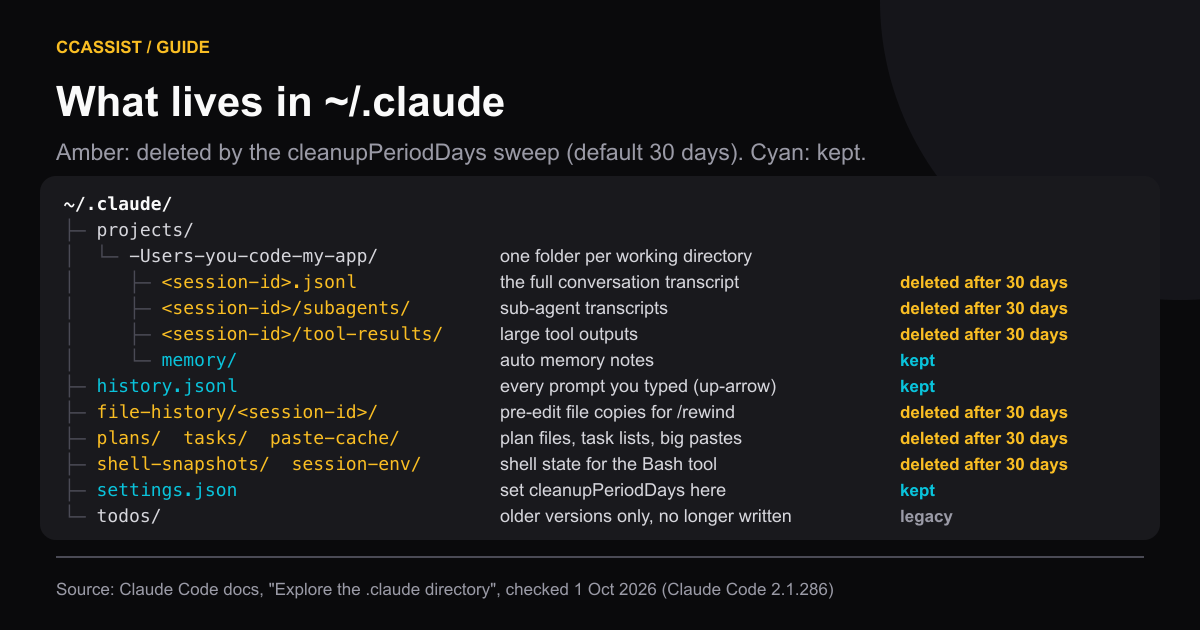
Path under ~/.claude/ | What it is | Removed by the sweep? |
|---|---|---|
projects/<project>/<session-id>.jsonl | The full transcript: every message, tool call and tool result | Yes |
projects/<project>/<session-id>/subagents/ | Transcripts of sub-agents (Task/Agent tool runs), one agent-<id>.jsonl plus a small .meta.json each | Yes, with the parent |
projects/<project>/<session-id>/tool-results/ | Tool outputs too large to keep inline | Yes |
projects/<project>/memory/ | Auto memory notes for that project | No |
history.jsonl | Every prompt you typed, with timestamp and project path. Powers up-arrow and Ctrl+R | No |
file-history/<session-id>/ | Copies of files taken before Claude edited them. /rewind restores from here | Yes |
plans/, tasks/, paste-cache/ | Plan-mode files, task lists, large pastes | Yes |
shell-snapshots/, session-env/ | Your shell's aliases and options, replayed for each Bash tool call; per-session environment | Yes |
settings.json | Your user settings, including cleanupPeriodDays | No |
todos/ | Written by older versions only; the sweep now empties and removes it | Legacy |
Two things live outside this folder. Per-project trust and MCP config sit in ~/.claude.json in your home directory. Images you paste are now saved under the system temp directory, not ~/.claude, and are deleted on the same schedule.
history.jsonl is worth knowing about when a transcript is gone: it survives the sweep, so your own prompts are still there, even though Claude's replies are not. Each line has display, pastedContents, timestamp and project keys.
What's inside a session file#
JSONL means "JSON Lines": one complete JSON object per line, appended as the session runs. You can read it with jq, grep, or any text editor.
Every conversation line carries the same envelope. Here is the shape of one assistant line from Claude Code 2.1.286, with the values removed:
{
  "type": "assistant",
  "uuid": "…", "parentUuid": "…", "sessionId": "…",
  "timestamp": "…", "cwd": "…", "gitBranch": "…", "version": "…",
  "isSidechain": false,
  "message": {
    "model": "…", "role": "assistant",
    "content": [{ "type": "thinking" }, { "type": "text" }, { "type": "tool_use" }],
    "usage": { "input_tokens": 0, "output_tokens": 0, "cache_read_input_tokens": 0, "cache_creation_input_tokens": 0 }
  }
}type: "user"lines hold what you typed (a plain string) or the result of a tool call (tool_resultblocks), plus any images.type: "assistant"lines hold Claude'stext,thinkingandtool_useblocks, and the token counts for that response.- Other types are bookkeeping. In one recent session I counted
attachment,system,mode,last-prompt,queue-operation,file-history-snapshotandfile-history-deltalines alongside the messages. parentUuidlinks each line to the one before it, which is how Claude Code rebuilds branches after/rewind.- Sub-agent files have the same envelope with
"isSidechain": trueand anagentId.
To pull every prompt you typed out of one session:
jq -r 'select(.type=="user" and (.message.content|type)=="string") | .message.content' <session-id>.jsonlAnthropic's docs are clear that this format is internal and "changes between versions, so scripts that parse these files directly can break on any release." For a stable interface, use /export, claude -p --resume <id> --output-format json, or the transcript_path field that hooks receive.
Why Claude Code history gets deleted after 30 days#
The setting is cleanupPeriodDays. According to the settings reference, checked on 1 October 2026:
- Default: 30 days. Minimum: 1.
- When: as a background sweep after a session starts. It deletes transcripts "without showing a message", so an old session simply stops appearing in
/resume. - What: everything marked "Yes" in the table above, including
file-history. After the sweep,/rewindinto that session can fail with "No files were restored" (checkpointing docs). - Exception: since v2.1.248, sessions you started or last continued in Claude Desktop or Cowork are kept at any age unless you set
desktopSessionCleanupPeriodDays.
This is the most common way people lose history. GitHub issue #62476, opened 26 May 2026 and still open, describes someone discovering that months of transcripts had gone while history.jsonl still listed 1,315 prompts from those sessions.
Don't set it to 0. Several older posts say 0 means "never delete". In older versions it actually stopped Claude Code writing transcripts at all (issue #23710). Current versions reject 0 with a validation error, and the docs recommend a large number instead.
There is no undo. Once a transcript is swept, Claude Code has no copy. The only way back is a file-level backup of your home folder (Time Machine, Windows File History, a snapshot of your Linux home), restored into the same projects/<project>/ folder.
How to keep your Claude Code history#
Do these in order. The first one takes a minute and stops further loss.
-
Raise the retention. Open
~/.claude/settings.json(create it if missing) and add:{ "cleanupPeriodDays": 3650 }That's about ten years. If you already have other keys, add this line inside the existing braces. A value in a project's
.claude/settings.jsonor in your organisation's managed settings overrides your user file, so if sessions keep disappearing, check those too. -
Check it took. Run
jq .cleanupPeriodDays ~/.claude/settings.json. If the settings file has a syntax error, Claude Code pauses the sweep and shows a warning in/status, which is safe but worth fixing. -
Copy the transcripts somewhere else. The setting protects against Claude Code's own sweep, not against a reinstall, a new laptop, or
claude project purge. A plain copy is enough:rsync -a ~/.claude/projects/ ~/Backups/claude-projects/Run it from cron or launchd, or make it a
SessionEndhook. Hooks get the session'stranscript_path, and the docs mention archiving the transcript as a use forSessionEnd. SessionEnd hooks get a 1.5-second budget by default, so keep the copy small or raise the hook'stimeout. -
Keep it out of git. If you version your dotfiles, add these to that repo's
.gitignore:.claude/projects/ .claude/history.jsonl .claude/file-history/ .claude/paste-cache/These files hold whatever passed through a tool, including
.envcontents and command output, so a public dotfiles repo is the wrong place for them.
For scale: on my machine, with cleanupPeriodDays at 90, ~/.claude/projects held 42 project folders, 753 session files and 1,622 JSONL files including sub-agent transcripts, 1.5 GB in total, on 1 October 2026. find ~/.claude/projects -name '*.jsonl' -mtime +90 returned nothing, which is the sweep doing its job.
If you mainly want to know what those sessions cost before they're deleted, the usage tracker post covers that side.
Is anything uploaded? Privacy and local files#
Two separate things happen to your conversation.
On your disk. Transcripts and history.jsonl are plaintext and not encrypted at rest; file permissions are the only protection (plaintext storage). If Claude reads a .env file, its contents are in the transcript. To write less:
- lower
cleanupPeriodDays - set
CLAUDE_CODE_SKIP_PROMPT_HISTORYto stop writing transcripts and prompt history - pass
--no-session-persistencefor a singleclaude -prun - run
claude project purge <path>to delete one project's transcripts, memory, file history and matchinghistory.jsonllines.--dry-runshows the plan first.
On Anthropic's servers. To run the model, Claude Code sends your prompts and the model's outputs to Anthropic over TLS. How long Anthropic keeps them depends on your account (data usage docs):
| Account | Retention on Anthropic's side |
|---|---|
| Free, Pro, Max with "help improve Claude" on | 5 years, may be used for training |
| Free, Pro, Max with it off | 30 days |
| Team, Enterprise, API | 30 days standard; zero data retention for approved Enterprise orgs |
The local .jsonl files themselves are not synced. A transcript file is uploaded only when you send one: via /feedback (kept 5 years), or by answering Yes to the "Can Anthropic look at your session transcript?" survey follow-up (kept up to 6 months). A Remote Control session also stores its transcript on Anthropic's servers while connected, so you can continue it on another device.
Where CCAssist fits#
CCAssist is a VS Code extension that reads these same ~/.claude/projects files (and Codex CLI's) locally and shows them as a searchable history with diffs. It doesn't change what Claude Code stores or deletes. If you use CLAUDE_CONFIG_DIR, point the claude-history.claudeDirectory setting at that folder, because the extension looks in ~/.claude by default.
For the cleanup problem specifically:
- Archive a session (right-click it and choose Archive Session) to copy its JSONL to
~/.ccassist/archives/(configurable withclaude-history.archiveDirectory), a folder Claude Code's sweep never touches. When Claude Code later deletes the original, the session stays viewable in the Archived tab, and Resume copies it back to~/.claude/projects/soclaude --resumefinds it. A Sync button refreshes archives with messages added since. Free covers 3 archived sessions; Pro removes the limit. Viewing and restoring archives is free. - Export to Markdown for a portable copy you can commit. Free covers 3 sessions.
What it does not do: it doesn't back up sessions automatically, and it can't bring back a transcript Claude Code deleted before you archived it. It only has what's on disk or in its archive folder. Set cleanupPeriodDays first; archiving is for the sessions you want to keep regardless.
To compare it with other tools for browsing history, see the best Claude Code VS Code extensions for 2026.
How we checked#
- Claude Code version: 2.1.286 on macOS, 1 October 2026.
- Docs read on 1 October 2026: sessions, .claude directory, settings reference, environment variables, checkpointing, hooks, data usage.
- Local data: folder names, file counts, sizes and JSONL key names only. No prompt text or project content is quoted; the example project is
-Users-you-code-my-app. - CCAssist: features checked against the extension source and changelog for version 0.7.5, the Marketplace release on 1 October 2026.
- Not verified: the Windows and WSL rows were not run on those systems; they follow the documented naming rule.
Install CCAssist from the VS Code Marketplace and your ~/.claude/projects sessions appear as a searchable, per-project history list in the sidebar, with Archive Session in each one's right-click menu.
Frequently asked questions
- Where does Claude Code store conversations?
- In ~/.claude/projects/<project>/<session-id>.jsonl, where <project> is your working directory path with every character other than letters and digits replaced by a dash. On Windows, ~ is %USERPROFILE%. Set CLAUDE_CONFIG_DIR to move the whole folder.
- Why did my old Claude Code sessions disappear?
- Claude Code deletes transcripts older than cleanupPeriodDays, which defaults to 30 days. The sweep runs in the background after a session starts and shows no message. Deleted transcripts can only come back from a backup of your home folder.
- How do I keep Claude Code history longer?
- Add "cleanupPeriodDays": 3650 to ~/.claude/settings.json. The minimum is 1 and 0 is rejected, so a large number is the way to keep transcripts for years. Copy ~/.claude/projects elsewhere as well if the history matters.
- Does Claude Code upload my local transcripts?
- The local .jsonl files stay on your machine. Prompts and model replies go to Anthropic to run the model and are retained under your account's data policy. A transcript file is uploaded only if you send /feedback or answer Yes to the transcript-sharing survey.
claude-codehistory