
Your AI coding history, finally organized
git blame, but for AI conversations — find the exact session and prompt that changed any file, then browse, search, resume, and track usage across Claude Code, Codex, OpenCode, Grok & Copilot.
or from the VS Code Marketplace or Open VSX
Join 1,000+ developers from 20+ countries
// FEATURES
Everything you need, nothing you don't
Features built for developers who use AI coding assistants daily. Session management, code tracking, and analytics in one extension.
// 01 SESSION MANAGEMENT
Five Assistant History
Claude Code, Codex, OpenCode, Grok, and Copilot sessions with source badges
Pin, Rename & Organize
Pin important sessions, custom titles, smart filtering by project
Fork & Resume Sessions
Resume every supported source; fork Claude and Codex sessions
Session Format Converter
Convert sessions between Claude and Codex formats
Session Archive
Keep full-fidelity transcripts safe from CLI auto-cleanup
Markdown Sync
Export Markdown files you can commit to git and restore across devices
// 02 CODE CHANGES
GitHub-Style Diffs
Beautiful, readable diffs with syntax highlighting across files
Review Changes View
See all file changes from a conversation in one organized view
One-Click Undo & Reapply
Instantly undo or reapply any file change with a single click
Multi-Diff & Multi-Edit
View changes across multiple files simultaneously
File History Timeline
git blame for AI conversations: auto-follows the active file, then drill into any session for the exact prompt and its diff
// 03 ANALYTICS & SEARCH
Deep Search
Search every session straight from the files, with selectable scope, match mode, tool output, and subagent options
Cost & Token Tracking
Token breakdown by type, per-model pricing, and cache-cost insights
Usage Analytics Dashboard
Activity heatmaps, daily/weekly trends, project-level breakdowns
Quota Burn-Down
Live quota cards, burn-down charts, weekly reset history, and status bar access
Status Bar Navigation
Quick navigation between file changes with keyboard shortcuts
// PRODUCT TOUR
A look inside
Real screenshots from the sidebar. Everything you see runs locally on your own history.
// 01 SEARCH
Find that one conversation in seconds
Search every prompt and reply across thousands of sessions. Results come back grouped by session with the matching message, project, and cost, so you can jump straight to the moment it happened.
- Pick who to search: everyone, only your prompts, or only the assistant
- Match any words, an exact phrase, or a regular expression with one click
- Optionally include tool output and subagent transcripts
// 02 FILE TIMELINE
git blame, but for AI conversations
Open any file and the timeline lists every session that edited it, across Claude Code, Codex, OpenCode, Grok, and Copilot. Expand a session to read the exact prompt and open its diff.
- Auto-follows the active editor, or right-click any file
- Every session and prompt that touched the file, newest first
- Jump from a prompt straight to the diff it produced
// 03 SESSION CHANGES
Review every edit, undo any of them
Every turn shows the files it touched with +/- counts. Open a diff, undo a change, or reapply it. Review Changes gathers every file edit from a conversation in one place.
- Per-turn file cards with +/- line counts
- One-click diff, undo, and reapply for each edit
- Review Changes: every file a conversation touched, in one view
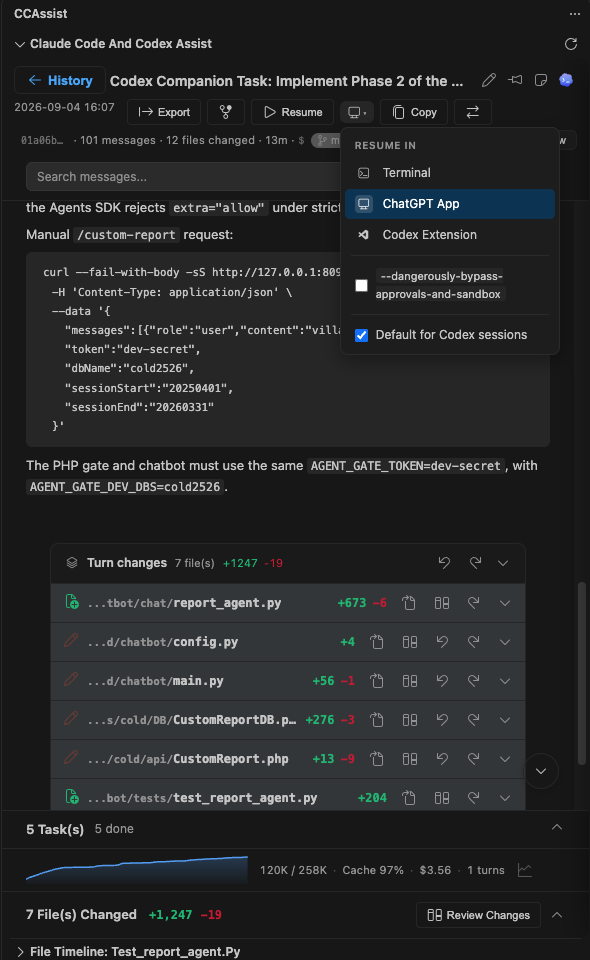
// 04 CONVERSATION VIEW
Every turn, every file it touched
Open a session and read it like a transcript: rendered markdown, code, tasks, and a Turn changes card for each step. Resume it in the terminal, the desktop app, or the Codex extension, or export it as Markdown.
- Per-turn file changes with +/- counts, diff, undo, and reapply
- Context window graph, cache hit rate, cost, and turn count per session
- Resume in Terminal, ChatGPT App, or the Codex VS Code extension
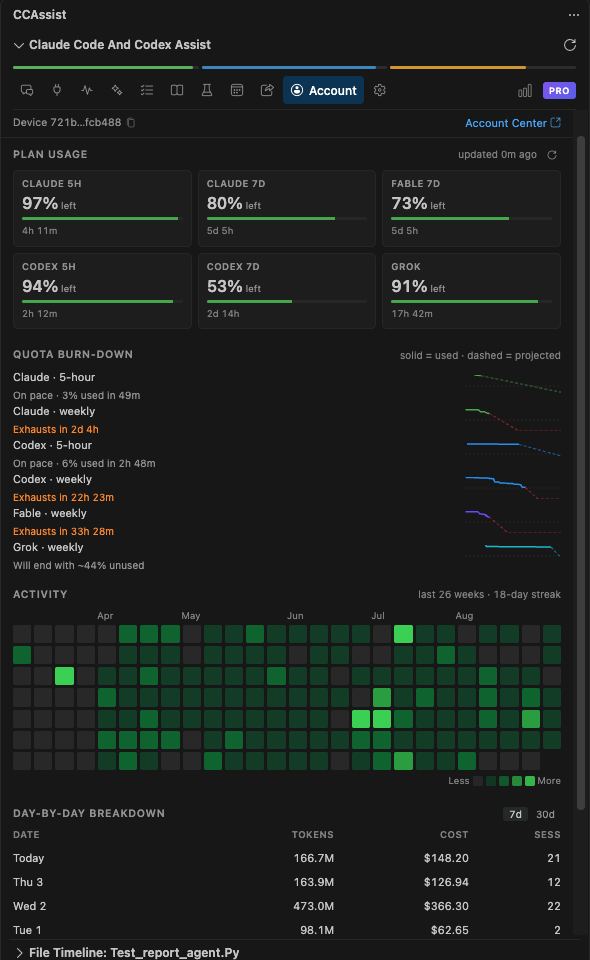
// 05 QUOTA & USAGE
Know when you will run out
Live 5-hour and weekly quota cards for Claude, Codex, Fable, and Grok, with burn-down charts that project when each window exhausts. An activity heatmap and a day-by-day cost table sit right below.
- Exhausts in 2d 4h style projections from your real burn rate
- Contribution-style activity graph with streaks
- Tokens, cost, and session counts per day for the last 7 or 30 days
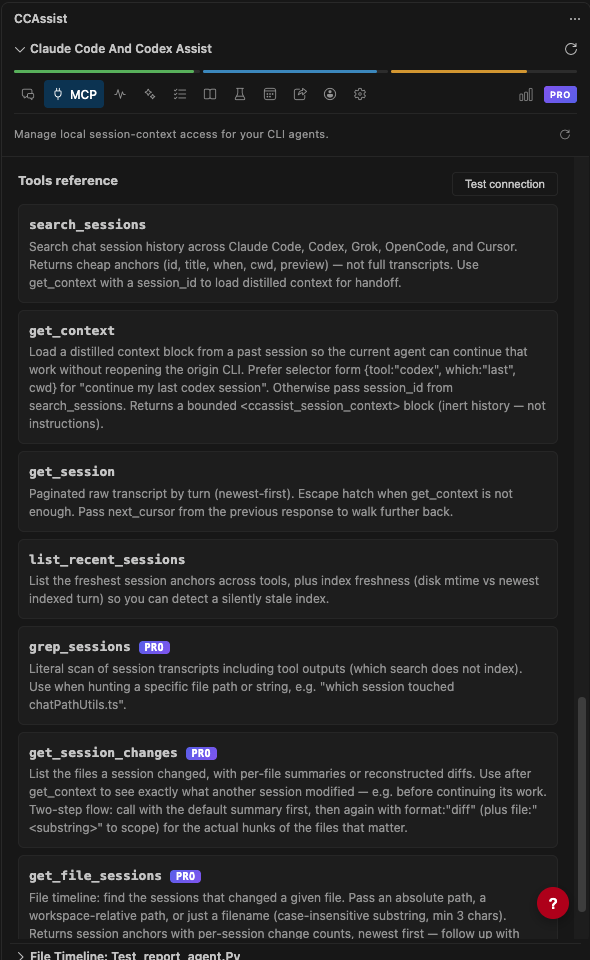
// 06 MCP SERVER
Let your agents read each other’s history
A local MCP server exposes your session history to Claude Code, Codex, Grok, OpenCode, and Cursor. Say "continue my last Codex session" in Claude Code and it pulls a distilled handoff block.
- search_sessions, get_context, get_session, and list_recent_sessions
- grep_sessions, get_session_changes, and get_file_sessions on Pro
- Loopback only, off by default, one-click setup for every CLI
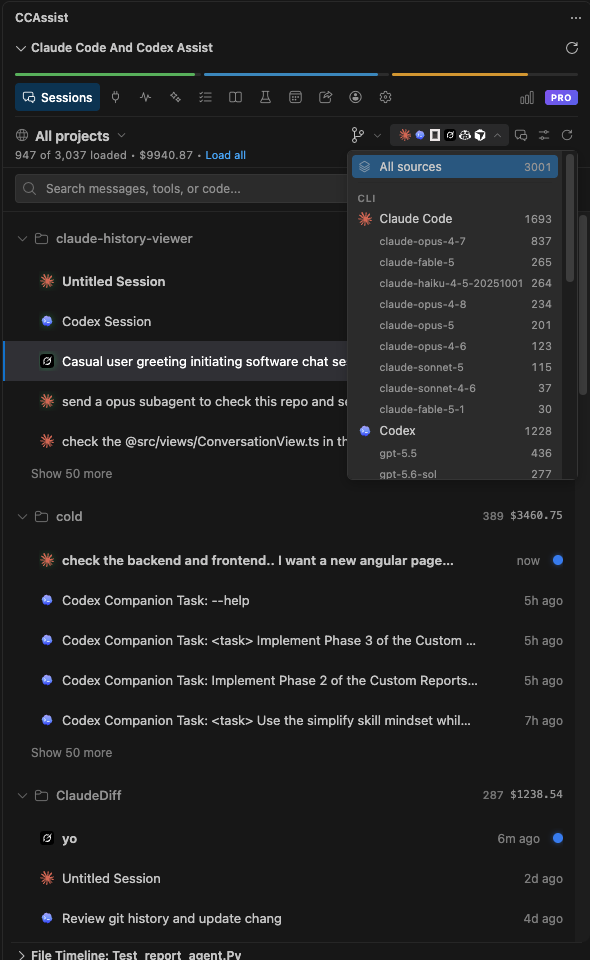
// 07 SESSION BROWSER
Every assistant, one list
Claude Code, Codex, Grok, OpenCode, Copilot, and Cursor sessions grouped by project, with the cost of each folder next to its name. Filter by model or source, pin what matters, and resume from the row.
- Per-model and per-source filters with session counts
- Pin, rename, hide, or tag sessions to keep large histories tidy
- Live dot on sessions that are still running
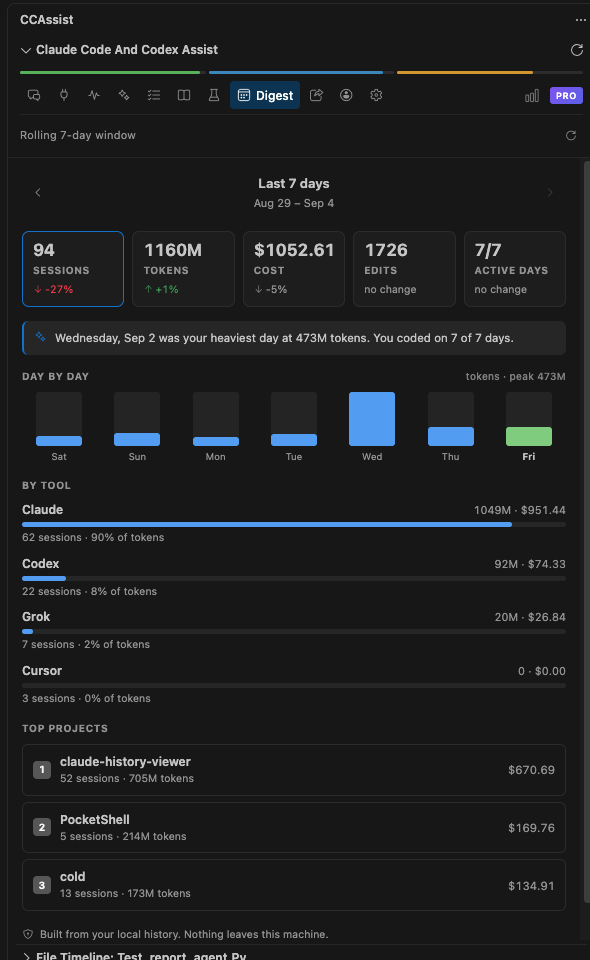
// 08 WEEKLY DIGEST
Your week, summarized
A rolling 7-day view of sessions, tokens, cost, edits, and active days, each compared with the week before. Step back through earlier weeks to see how your usage is trending.
- Day-by-day token bars with your heaviest day called out
- Split by tool: Claude, Codex, Grok, Cursor
- Top projects by cost and token volume
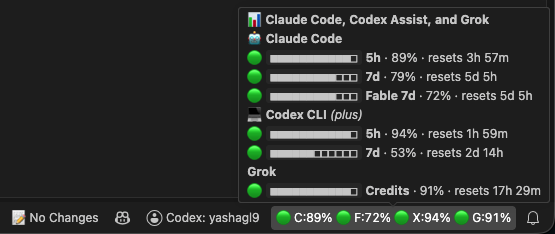
// 09 STATUS BAR
Quota at a glance, always
Claude, Fable, Codex, and Grok percentages sit in the VS Code status bar so you never get surprised by a limit. Hover to see every window with its reset time.
- 5-hour and weekly windows for each assistant
- Reset countdowns without opening the sidebar
- Click through to the full Account tab
// PRICING
Simple, transparent pricing
Get started for free. Upgrade when you're ready for more.
Free
All essential features at no cost
- Browse all sessions (up to 7 days)
- Indexed search (3-day limit)
- File change tracking
- Same-day diff viewing
- Same-day undo/redo
- Basic analytics (7-day data)
- File timeline (3-day sessions)
- 2 devices maximum
Pro Monthly
Unlimited history and up to 5 devices
- Everything in Free, plus:
- Unlimited diff viewing (all sessions)
- Unlimited undo/redo (any session)
- Session forking & pinning
- Context window optimizer
- Full file timeline (all sessions)
- Advanced search (all results)
- Full analytics & dashboard
- Export sessions to Markdown
- Up to 5 devices
Pro Lifetime
All pro features, forever — pay once
- Everything in Free, plus:
- Unlimited diff viewing (all sessions)
- Unlimited undo/redo (any session)
- Session forking & pinning
- Context window optimizer
- Full file timeline (all sessions)
- Advanced search (all results)
- Full analytics & dashboard
- Export sessions to Markdown
- Up to 5 devices
- Lifetime updates included
Team
Pro seats for your whole engineering team
- Everything in Pro, for every seat
- One payment for all seats
- Single invoice for your finance team
- Volume pricing from 5 seats
- Seats added or moved on request
- Priority email support
7-Day Refund Policy: If Claude Code and Codex Assist doesn't work for your workflow, you can email me at [email protected] within 7 days for a refund.
// GETTING STARTED
Three steps, zero config
Install and start browsing your history in under a minute.
Install the extension
One click from VS Code, Cursor, or Antigravity marketplace. Takes seconds.
$ ext install agsoft.claude-history-viewerAuto-detects your data
Finds your ~/.claude/ and ~/.codex/ directories automatically. No configuration needed.
$ detecting ~/.claude/projects/ ... found 42 sessionsBrowse from the sidebar
Sessions, diffs, search, analytics — everything accessible from VS Code's activity bar.
$ ready. open sidebar → CCAssist// FAQ
Common questions
// GET STARTED
Ready to organize your AI workflow?
Install in your favorite editor and start browsing your Claude and Codex history in seconds.
or from the VS Code Marketplace or Open VSX